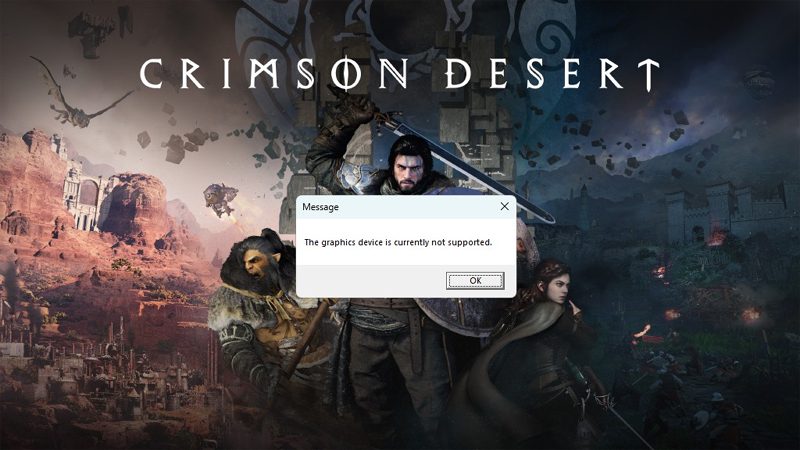
Crimson Desert is a highly ambitious, single-player open-world action-adventure game developed by Pearl Abyss and released on March 19, 2026. It focuses on fast-paced, hack-and-slash combat and exploration of a vast,, visually impressive, fantasy world called Pywel.
Players follow the story of Kliff, a mercenary leader seeking revenge, navigating political conflict and immense, sometimes overwhelming, side activities.
In this post, you will learn how to fix error The graphics device is currently not supported In Crimson Desert.
Crimson Desert The Graphics Device is Currently Not Supported Error – Does It Really Have Fixes?
Well, if your PC has Intel Arc GPU, then it is not fixable. This error can only be fixed from the Crimson Desert Game Developers side – which looks unlikely that they will fix it for you.
In the FAQ for Crimson Desert page, Pearl Abyss has confirmed that Intel Arc graphics cards are not supported by this game.
This is what they have mentioned:
Does Crimson Desert support Intel Arc?
No, Crimson Desert currently does not support Intel Arc graphics cards. If you purchased the game expecting Intel Arc support, please refer to the refund policy of the platform where the game was purchased for available options. We apologize for any inconvenience caused.
From the players perspective, this is not a good news for them because currently the Crimson Desert is the most popular titles in the PC games.
If you check one of the post on the Intel Community, you will see that the users are posting about this same issues.
Here what one of the user has replied to this Intel Community post, regarding this error:
This is not an Intel driver issue. Game has some sort of driver whitelist that does not include Intel for some reason.
Bring it up to the developer that this should be a warning rather than breaking loading of the game.
This is especially bad for preservation, as the game may not boot in future hardware or even drivers if version changes so much it won’t parse the string.
So, unluckily if you have Intel Arc graphics card driver then you can’t play Crimson Desert game and there is no fix for this.
Now, the question is – What if your PC has the supported graphics card and yet you are getting the same error? Well, then in that case, here comes the fix part. Below follow the fixes for error The graphics device is currently not supported in Crimson Desert.
How To Fix Crimson Desert Error The Graphics Device Is Currently Not Supported
Before performing any of the fixes mention in this guide, first the game system requirement.
You can check the Crimson Desert Steam store webpage.
There they have mentioned that Minimum Graphics requirement is: RX 5500 XT / GTX 1060 and Recommended Graphics requirement is: RX 6700 XT / RTX 2080.
So, if you meet these Graphics requirement then you can play the game and you will not get this graphics currently not supported error.
To fix the Crimson Desert error The graphics device is currently not supported, you can perform these solutions:
- Update Your Graphics Card Driver To Latest Version
- Perform Clean Installation of Graphics Card Driver
- Run the game on Dedicated Graphics card driver
- Rollback Graphics Card Driver
- Disable integrated graphics card
Note: These Fixes Will Work For Supported Graphics Card Only.
Fix 1. Update Your Graphics Card Driver To Latest Version
If you have outdated version of graphics card then you might face this error. So, just update your graphics card driver to the latest version and then check.
- NVIDIA → GeForce Experience or official website
- AMD → Adrenalin Software
Fix 2. Perform Clean Installation of Graphics Card Driver
- NVIDIA → GeForce Experience or official website
- AMD → Adrenalin Software or official website
You have to just search and select your correct Graphics card driver version and re-install it and while installing it, tick mark the perform a clean installation box. And once the clean installation is done, just restart your PC and then launch game and check.
Fix 3. Run the Game on Dedicated Graphics Card Driver
- In Windows Search, type Graphics settings and open it.
- Click on Add desktop app and then browse to the game installation folder.
- Browse to – C:\Program Files (x86)\Steam\steamapps\common\CRIMSON DESERT\bin64 folder.
- Select CrimsonDesert exe file and and click on Add to add to the list.
- After adding it, expand it, next to GPU preference click on drop down and select “High Performance”.
- Now, relaunch the game and check.
Fix 4. Rollback Graphics Card Driver
- For NVIDIA graphics card driver users – roll back to Nvidia Driver 591.44 version.
- So, go to Nvidia official website and do the manual search for your graphics card driver version and then download the 591.44 version and install it.
- Restart your PC, launch the game and check.
- Similarly, if you have AMD graphics card, then rollback to any previous version and then check.
Fix 5. Disable Integrated Graphics Card
- In Windows Search, type Device Manager and open it.
- Expand Display adapters, right-click on Integrated Graphics card and select Disable device, click Yes to confirm.
- Now, launch the game and check.
Note: After playing the game enable integrated graphics card.
Share this post so that it can help other players.